PDFs Run Your Day. Make Them Easier to Run.
Your team redacts patient records, routes lease addenda, edits RFP responses, and chases signatures on contracts — usually all before lunch. The right PDF platform turns that work from a daily friction point into something that just happens. Tungsten Power PDF gives your people the editing, security, and e-signature tools they actually use, on a license model built for how organizations actually budget. Novatech makes sure it fits your team, your compliance rules, and your stack.
What is Tungsten Power PDF?
Power PDF is the desktop and cloud PDF platform from Tungsten Automation (formerly Kofax). Over 10 million users rely on it to do the everyday work that PDFs require: create, edit, convert, redact, OCR, e-sign, and collaborate.
Three things make it different from the PDF tool you’re probably renting right now:
- It feels like Microsoft Office. The ribbon interface looks like Word. Onboarding a new hire takes minutes, not a training session.
- You own the license. Standard and Advanced are perpetual — buy once, keep forever. Business is available as SaaS if you want cloud editing and Microsoft Teams co-authoring.
- It plays nicely with the stack you already have. Microsoft 365, SharePoint, OneDrive, Google Drive, Box, Dropbox, and iManage are all native connections. SignDoc handles e-signatures inside the same app.
Translation: it does the everyday PDF work most knowledge-worker teams need — and the licensing math stays predictable as you grow.

How Much Does Tungsten Power PDF Cost?
The honest answer: it depends on edition, license type, and seat count. Here’s what each option includes so you can see where you’d fit.
- Power PDF Standard. Single-user, perpetual license. Best for individuals and small teams who need core create/edit/convert/sign.
- Power PDF Advanced. Single-user, perpetual license. Adds redaction, advanced security, and deeper enterprise integrations (Box, OneDrive, SharePoint, Evernote).
- Power PDF Business. Volume licensing for teams. Available as perpetual or SaaS. Includes Cloud Editor, Microsoft Teams integration, centrally managed security, and document management system connectors (iManage, SharePoint, eDOCs).
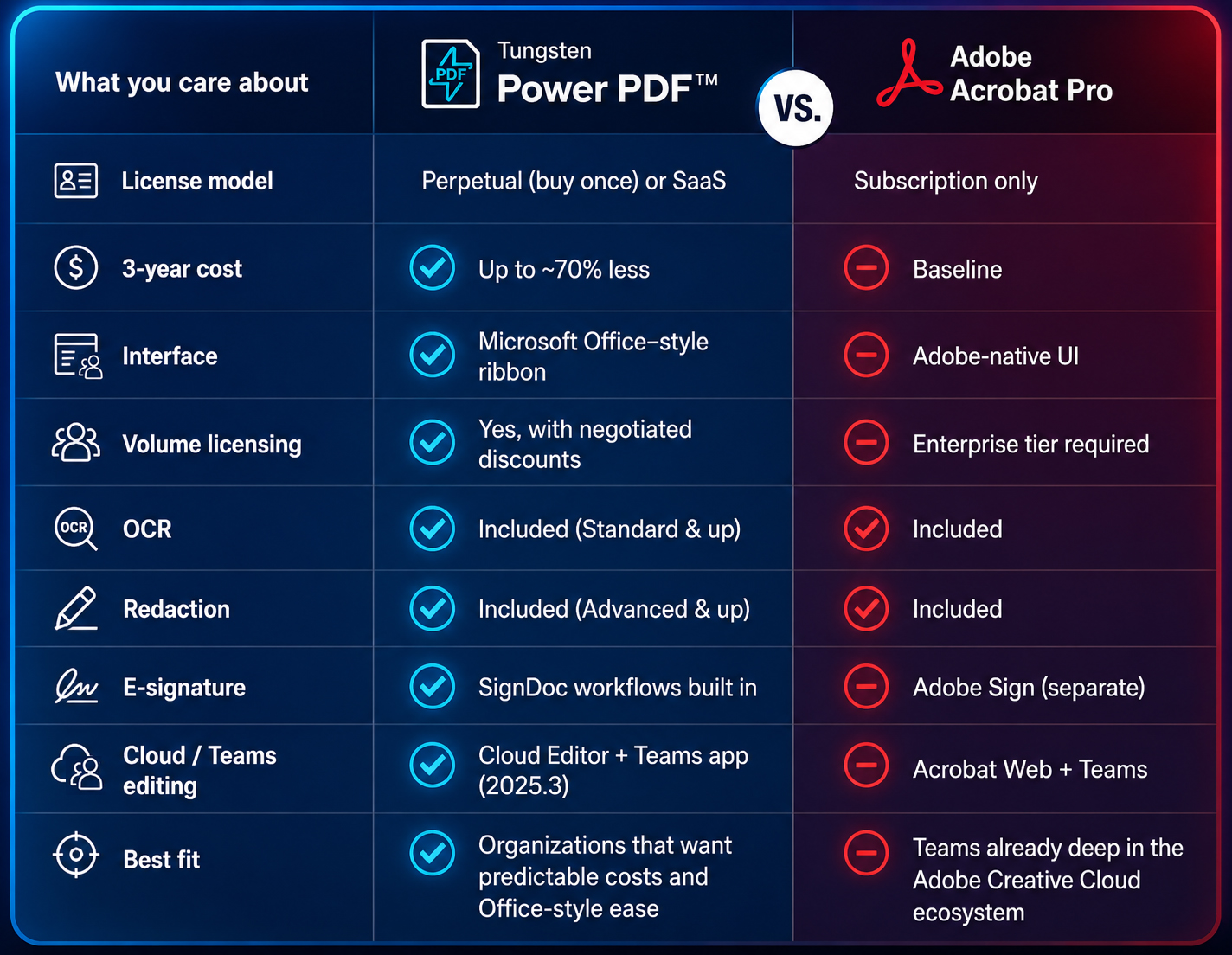
Tungsten publishes a public comparison showing Power PDF can be up to roughly 70% less expensive than Adobe Acrobat over a three-year window — useful context if you’re already evaluating Adobe. Volume discounts go further. Novatech handles the bid and contract so you see the all-in number before you commit.
Heads up: if you’re already on an Adobe enterprise agreement, don’t switch in the middle of a term. Talk to us 90 days before renewal and we’ll model the savings against your real usage.
Power PDF vs. Adobe Acrobat: An Honest Comparison
We sell both worlds — software and the printers and IT services around them — so we have no reason to lie to you about either product. Here’s the side-by-side we use with our own customers:

When Adobe is still the right answer: if your designers live in Creative Cloud, if you have deep custom JavaScript in Acrobat forms, or if a specific compliance regime in your industry mandates Acrobat Pro by name, stay where you are. We’ll tell you that.
When Power PDF wins: almost every other scenario — especially anywhere licensing cost, ease of training, or perpetual ownership matters.
The Real Problems Power PDF Solves
Buyers usually come to us with one of these five frustrations. Power PDF is the answer to all of them.
1. “My Adobe bill keeps climbing and half the seats barely log in.”
Subscription creep is real. With Power PDF, you buy what you need. Perpetual licenses don’t renew. SaaS seats can be sized to actual users. Either way, the math gets predictable again.
2. “We’re emailing PHI/PII inside PDFs and I lose sleep over it.”
Redaction, AES encryption, password and certificate-based protection, and secure-print integration are built in. Sensitive data leaves the page before the document leaves the building.
3. “Contracts and forms take forever to turn around.”
SignDoc-powered e-signatures, drag-and-drop form-field creation, and OCR for scanned paperwork compress days into hours. Add Microsoft Teams and SharePoint co-editing and the back-and-forth simply ends.
4. “My team keeps printing PDFs to mark them up, then scanning them back in.”
Power PDF’s annotation, stamping, and markup tools are built for the way people actually review documents. Paired with Novatech’s managed print and capture-and-route solutions, you cut paper out of the loop entirely.
5. “IT is spending hours fighting versions of one document across email.”
Cloud Editor (new in Power PDF 2025.3) lets multiple people edit the same PDF in a browser. SharePoint integration keeps everyone on the latest version. Version chaos goes away.


Who We Built This Page For
Power PDF works anywhere documents drive the work. Tungsten built it for organizations across:
- Legal
- Healthcare
- Financial Services
- Government
- Professional Services
- Construction & Engineering
- Manufacturing
- Education
- Retail & Distribution
Novatech serves customers across all of these. The three verticals below are where we go deepest — they’re where we know the workflows, the compliance rules, and the people. If your industry isn’t called out here specifically, you’re still in the right place: the playbook works the same way.
If you run clinical operations, manage a practice, or own health information for a hospital or clinic, PDFs are how patient data moves. That makes them a compliance landmine and a productivity drain at the same time.
- For Health Information Managers, Medical Records Directors, and HIM Directors: PHI redaction, audit-friendly document handling, and secure print release tied to user identity. HIPAA controls live inside the workflow, not as an afterthought.
- For Clinical Operations, Operations Directors, and Practice Administrators: fewer printer outages and faster document handling mean patient flow doesn’t stall at the front desk. Rules-based printing and one-click conversion keep clinicians focused on patients.
- For IT leaders, CIOs, and IT managers: centrally managed licensing, AES encryption, and integration with your existing identity and security stack. Less shadow IT, more compliance evidence at audit time.
- For CFOs, Controllers, and Finance Managers: transparent licensing, reduced print spend, and a clear path away from year-over-year Adobe increases. Costs you can defend in a board meeting.
- For Facilities and Office Managers: one vendor relationship for software, printers, supplies, and service. Fewer phone numbers to remember.
Schools have two operating realities: a procurement cycle that runs on RFPs and leasing agreements, and an operations team that has to keep buildings, budgets, and technology running without ever blinking. Power PDF helps both.
- For Directors of Purchasing, Procurement Managers, and Logistics Coordinators: Novatech can write the RFP language for you, slot Power PDF into your existing technology programs and cooperative purchasing agreements, and structure leasing so software lines up with your hardware refresh.
- For Assistant Superintendents of Operations, COOs, and Business Services Directors: one budget conversation for facilities, print, and document software. Cleaner reporting, fewer line items, no surprise renewals.
- For IT Directors, IT Managers, and CIOs: secure print release, student-data protection, centrally managed deployment, and a license model that fits an IT budget instead of fighting it.
- For CFOs, Finance Directors, and Controllers: cost transparency and redirectable spend. Move dollars from Adobe subscriptions into the classroom.
Brokerages, agencies, and mortgage offices (typically 20–250 employees) live and die on contract turnaround. Every day a disclosure sits unsigned is a day a deal can fall apart.
- For Office Managers and Operations Managers: simple pricing, easy onboarding, and a single point of contact for software and print. We manage the lifecycle so you don’t have to.
- For Owners and Principals: a P&L line that finally shrinks, agent productivity that finally grows, and a platform that scales when you open the next office.
- For CFOs, Controllers, and Finance Managers: perpetual licensing, redirectable cost, and a clean answer to “why are we paying Adobe this much?”
- For IT Leaders and CIOs (or the office manager wearing the IT hat): centrally managed security, encrypted PDFs, and compliance documentation that satisfies your E&O carrier and your lender partners.
Your Plan with Novatech
We’ve kept this simple on purpose. Three steps and you’re done.
- Tell us what you have. A 20-minute call. We learn your current PDF tools, seat counts, contract renewals, and compliance requirements.
- We build the right license mix. Standard, Advanced, Business, perpetual, SaaS — we model it against your actual usage and your real budget cycle. Volume pricing included.
- We deploy and support it. Rollout, user training, integration with your copiers, and ongoing help through the same Novatech support team that already handles your print fleet and managed IT.
What You Avoid — and What You Get. Without the right plan, this is what we see:
- Adobe renewals that quietly grow 8–15% a year
- PHI, student data, or financial details leaving the building inside un-redacted PDFs
- Contracts that sit unsigned because the e-signature tool isn’t where the document lives
- IT chasing five versions of the same PDF across email
With Power PDF + Novatech, this is what happens instead:
- A predictable, owned-license cost that frees real budget for people and patients and students
- Documents that leave the building only when they’re supposed to, and only with the data they’re supposed to carry
- E-signature, redaction, OCR, and conversion in one tool your team already knows how to use
- One vendor (us) accountable for the whole document workflow — print, capture, edit, sign, store
Frequently Asked Questions
Power PDF Standard and Advanced are perpetual licenses — buy once, own forever, no monthly fees. Power PDF Business is available as either perpetual volume licensing or a SaaS subscription, depending on whether you want Cloud Editor and Microsoft Teams co-authoring. Novatech handles volume bids and special pricing on your behalf.
Yes. Power PDF Business gives you network deployment, centrally managed security, document-access restrictions, and integrations with iManage, SharePoint, and eDOCs. It’s built for IT teams who don’t want to log into every workstation.
Same core capabilities — create, edit, convert, redact, e-sign, OCR — at up to roughly 70% lower three-year cost, on a Microsoft Office–style interface most users learn in a single sitting. See the comparison table above for the side-by-side.
Yes. Power PDF handles scanned input, OCR, and conversion natively. If we manage your print fleet, we can tie Power PDF into capture-and-route workflows so scanned documents land in the right folder, in the right format, with the right metadata.
Power PDF supports AES encryption, certificate-based document protection, redaction, and secure print release. Those are the controls your compliance team needs to build HIPAA, FERPA, and similar workflows around. Novatech helps you configure them so the controls match your policy, not just the marketing checklist.
Version 2025.3 (released November 2025) added a browser-based Cloud Editor, a Microsoft Teams app, deeper SharePoint integration, native Windows-on-ARM support, and stronger accessibility tagging for PDF/UA-2. If you’re standardizing on Microsoft 365 or running modern Surface or ARM hardware, this release matters.
Yes. Tungsten offers a 15-day free trial. Novatech can also set up a guided proof-of-concept with a slice of your team so you can validate the workflow before you commit to a license count.
Through Novatech. You call our support team — the same one that handles your copiers, your managed IT, or both — and we handle the Tungsten side for you. One number, one accountable partner.
More
Ready to See the Numbers?
We'll put together a license comparison against your current Adobe spend and show you the three-year picture. No commitment, no script.